
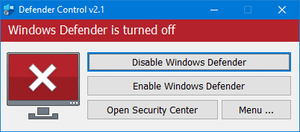
dControl
Open Windows Security:
Click the Search icon on the taskbar and type "Windows Security".
Select the Windows Security app from the search results.
Access Virus & Threat Protection:
In the Windows Security window, click on Virus & threat protection.
Manage Protection Settings:
Under the Virus & threat protection settings section, click Manage settings.
Turn Off All Protections:
Toggle the switches to Off for all available protections:

After that, download the tool above, extract it with an tool such as WinRAR, Once done, run the dControl.exe as admin, and click on "Disable Windows Defender"
Last updated