# Running the Cheat

**1. Download the Loader, and register an Account.**\
[Click here](https://panel.forums-aquacheats.cc/share/riGZX9fr) to download the Loader.<br>

**2. Run as Administrator**\
Once the download is complete, right-click the Loader and select **"Run as administrator"** to launch it with the necessary permissions.

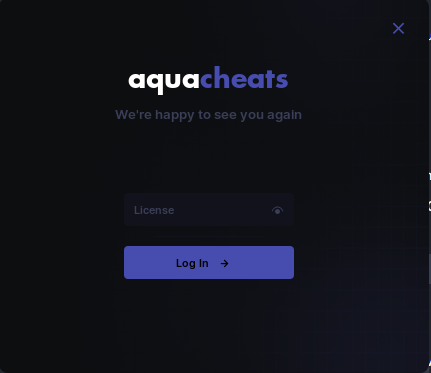
**3. Log In**\
You’ll see a login screen. Enter just your key to proceed

<figure><img src="https://573490764-files.gitbook.io/~/files/v0/b/gitbook-x-prod.appspot.com/o/spaces%2Fd3qpIBnzaRkPNPtFtGM3%2Fuploads%2FVBe8dWIdA4XcI7tOkBdB%2Fimage.png?alt=media&#x26;token=40e42f24-37dc-46dc-9250-fe89833594d1" alt=""><figcaption></figcaption></figure>

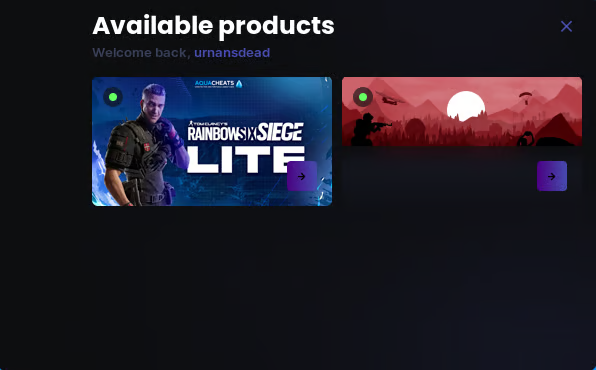
**4.Select Your Product**\
After logging in, select the product you would like to load:<br>

<figure><img src="https://573490764-files.gitbook.io/~/files/v0/b/gitbook-x-prod.appspot.com/o/spaces%2Fd3qpIBnzaRkPNPtFtGM3%2Fuploads%2F6Ar9zctji4mWZ1AhC1xE%2Fimage.png?alt=media&#x26;token=58e7ad61-c4b9-4a4f-a17b-7be5b5c6ae96" alt=""><figcaption></figcaption></figure>

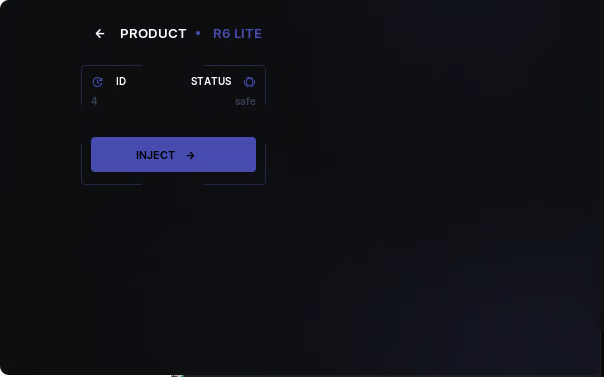
**5. Select Options**\
After selecting your product, you'll see the following menu:

<figure><img src="https://573490764-files.gitbook.io/~/files/v0/b/gitbook-x-prod.appspot.com/o/spaces%2Fd3qpIBnzaRkPNPtFtGM3%2Fuploads%2FQDX2jOrFryZvKn5mvLkt%2Fimage.png?alt=media&#x26;token=a756fcfa-2285-49de-bd36-e1d924abdbbd" alt=""><figcaption></figcaption></figure>

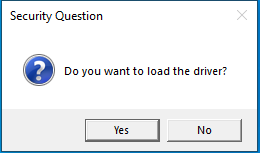
**6. Load the Module (INJECT)**\
A prompt will appear asking if you want to load the driver:

<figure><img src="https://573490764-files.gitbook.io/~/files/v0/b/gitbook-x-prod.appspot.com/o/spaces%2Fd3qpIBnzaRkPNPtFtGM3%2Fuploads%2FBqN9ezf22v9UyCr7aBeA%2Fimage.png?alt=media&#x26;token=1bd92b67-5927-4141-9d06-faf1643192c4" alt=""><figcaption></figcaption></figure>

{% hint style="success" %}
**Select&#x20;*****Yes*** on the **first attempt** opening the cheat
{% endhint %}

{% hint style="warning" %}
**Select&#x20;*****NO*** on any attempt **after** the first
{% endhint %}

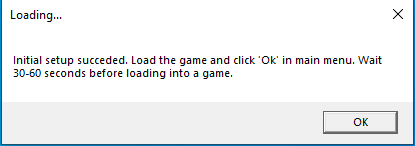
**7. Injection**\
After Loading Driver, The following message box will appear:<br>

<figure><img src="https://573490764-files.gitbook.io/~/files/v0/b/gitbook-x-prod.appspot.com/o/spaces%2Fd3qpIBnzaRkPNPtFtGM3%2Fuploads%2FPAlGxJRlyvqvyVrGZgz6%2Fimage.png?alt=media&#x26;token=d3ac4c95-c130-471c-9a26-39d287688305" alt=""><figcaption></figcaption></figure>

**9. Launch Rainbow Six Siege!**&#x20;

{% hint style="success" %}
All Launchers for Rainbow 6 Siege are **SUPPORTED**
{% endhint %}

**9. FInal Steps**\
Once you're at the **Main Menu** , Alt tab to the "Loading" Message box

Click **OK**\
\&#xNAN;*This will inject the cheat into the game.*

#### 10. Waiting for the Cheat to Initialise.

You will need to wait around 60 Seconds and you will see <mark style="color:red;">red text appear top left of the screen</mark>

<figure><img src="https://573490764-files.gitbook.io/~/files/v0/b/gitbook-x-prod.appspot.com/o/spaces%2Fd3qpIBnzaRkPNPtFtGM3%2Fuploads%2FBaerp5Hkv1a6GDZhYpvS%2Fimage.png?alt=media&#x26;token=dc1bb126-5cef-4265-94d6-683f39e7d9a5" alt=""><figcaption></figcaption></figure>

{% hint style="warning" %}
On Average this disappears and injection is complete after around 25 — 60 Seconds

Note : Don’t open gui in menu only when you have spawned in the game<br>
{% endhint %}